Setup takes 60 seconds. Your Rise nightlight is already linked to your phone.
Plug Rise in yourself or have your parent unbox it. Nothing to pair, configure, or download. It arrives ready to work.
Quick Start Guide
Up and running in three steps.
Pick a Morning Path
Pick an open, always-on outlet along their morning walk, such as the bedroom hallway, bathroom doorway, or kitchen counter.
Plug Rise In
Attach the included USB-C power adapter and plug it into the wall. The warm amber halo pulses for 30 to 60 seconds while connecting over cellular.
Get Your Confirmation Text
When the halo turns steady warm amber, your checkout phone number gets a text confirming Rise is live.
Where to plug it in
Placement Do’s & Don’ts
One unit covers most homes. Pick an outlet with a clear view of their morning path.
Open, High-Traffic Morning Area
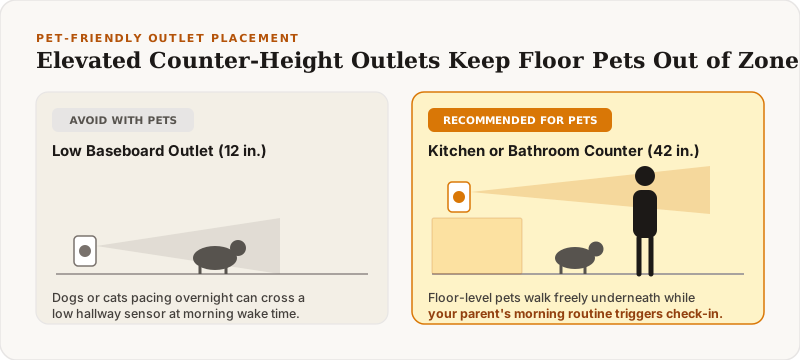
Plug it into an unobstructed outlet in a high-traffic morning area (hallway, kitchen, or bathroom path).
- ✓ Hallway outside the bedroom or bathroom doorway
- ✓ Kitchen outlet near the coffee maker or sink
- ✓ Always-on wall outlet (not controlled by a wall switch)
Hidden Outlets or Facing the Bed
Hide it behind furniture or curtains, or point it directly at their mattress where normal sleep tossing could trigger an early alert.
- ✕ Behind couches, dressers, or heavy floor-length drapes
- ✕ Pointed straight at a bed where tossing/turning happens
- ✕ Outlets turned off by a wall light switch
Living with Rise
Daily Operation & SMS Controls
One Morning Text
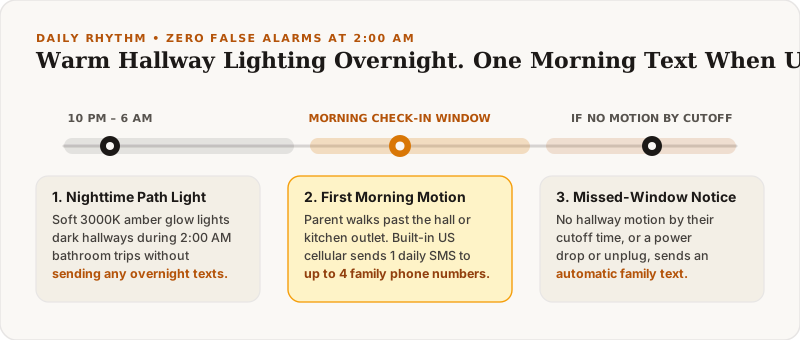
Rise watches for their first movement between 6:00 AM and 10:00 AM and sends one text when their day starts. No alerts all afternoon.
Need to Change Settings?
Reply to any Rise text (or message Zach) to change the morning window, add up to 4 family phone numbers, or pause alerts during trips.
100% Private by Design: Rise contains zero cameras and zero microphones. It simply senses hallway motion and lights your path at night.
 Questions about outlet placement in your parent’s home? Ask Zach in Minnesota.
Related reading